
Take control of your lyrics on Musixmatch Pro to add, edit, and sync your lyrics, and distribute them to all major digital streaming services and social media networks like Spotify, Apple Music, Instagram, Amazon Music, Google, and many more.
You will have full control over your lyrics and, once verified, they will be displayed as your official lyrics.
Register on Musixmatch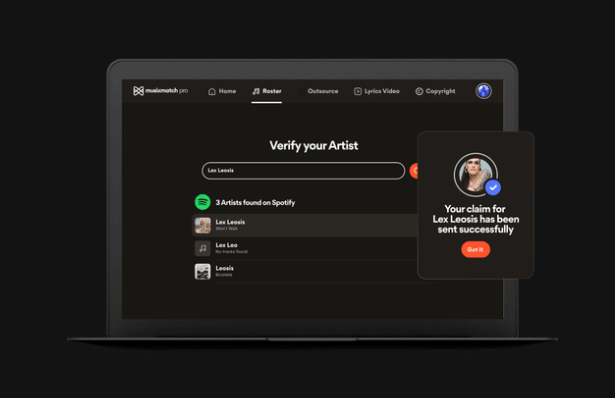
Use Musixmatch to add your official lyrics, sync them with your music, and enrich them with metadata like song structure, credits, and translations.
Synced lyrics significantly enhance your fans' experience and increase engagement with your music across all platforms.
Get started now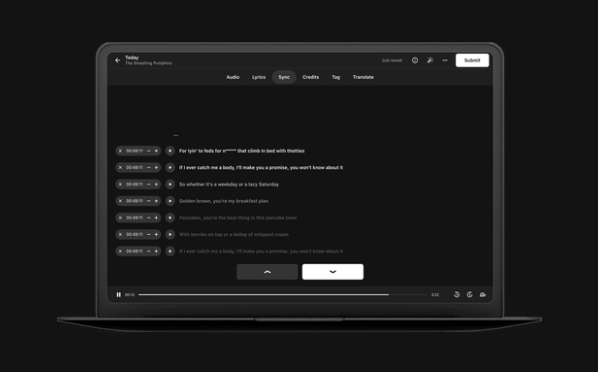
Discover the benefits of having your lyrics officially synced
Songs with synced lyrics generate up to 70% more user interaction on streaming platforms.
Your lyrics will be available in over 80 languages, allowing you to connect with fans worldwide.
Synced lyrics improve the visibility of your songs in searches and algorithmic recommendations.
Ensure your official lyrics are the ones displayed, preventing unauthorized or incorrect versions.
Your fans can easily share snippets of your lyrics on social media, boosting your visibility.
Add translations to your lyrics to connect with international audiences and expand your global reach.
Follow these steps to start managing your lyrics on Musixmatch
Visit musixmatch.com/artist-signup and create an artist account with your email. Make sure to use an email you have regular access to.
Complete the verification form providing information about your artist profile, links to your profiles on streaming platforms and social media. This will help Musixmatch confirm you are the legitimate artist.
The Musixmatch team will review your application. This process can take between 1-7 business days. Once approved, you will receive a confirmation email with access to Musixmatch Pro.
Log in to your verified account and access the artist control panel, where you can see all your songs available on streaming platforms.
A step-by-step guide to managing your lyrics on Musixmatch
On your artist dashboard, find the song you want to add or edit lyrics for. If you cannot find your song, you can search for it by title or add it manually.
Click "Add lyrics" and type or paste the full text of your song. Make sure to check spelling and punctuation. You can format the text to separate verses, choruses, and bridges.
Use the sync tool to align each line of your lyrics with the song audio. You can do this manually line by line or use the auto-sync function and then adjust as necessary.
Enrich your lyrics by adding metadata such as song structure (verse, chorus, bridge), songwriting credits, and translations into other languages to expand your global reach.
Once you are finished, save and publish your lyrics. Musixmatch will automatically distribute them to all partnered platforms, including Spotify, Apple Music, Instagram, and more.
Musixmatch distributes your lyrics to major digital platforms
Everything you need to know about Musixmatch
Yes, registering as an artist on Musixmatch is completely free. There are no fees to verify your profile, add your lyrics, or sync them with your music.
Once you publish your lyrics on Musixmatch, they typically appear on different platforms within 1 to 2 weeks. This timeframe can vary depending on each platform and their internal update processes.
Absolutely! You can sync lyrics for songs that are already distributed on digital platforms. In fact, it is highly recommended to do so for all your existing songs to improve your fans' experience.
Yes, you can update your lyrics at any time if you need to make corrections or changes. Simply access your artist dashboard, select the song, and edit the lyrics. Updates will distribute to all platforms, though they may take some time to reflect.
By verifying your artist profile, you will have the authority to correct any incorrect lyrics uploaded by users. Your verified lyrics will take priority and replace unofficial versions across all platforms.
Sign up today on Musixmatch and start syncing your lyrics to enhance your fans' experience and boost your music's visibility across all platforms.
Register as an artistAgrega la aplicación 1M Music a tu pantalla.
Desplázate hacia abajo y haz clic en: